1-866-SDRobot (866-737-6268)


MD03 Motor Controller Support
MD03 - 50Volt 20Amp H Bridge Motor DriveÂ
The MD03 is a medium power motor driver, designed to supply power beyond that of any of the low power single chip H-Bridges that exist. Main features are ease of use and flexibility. The motor's power is controlled by Pulse Width Modulation (PWM) of the H-Bridge at a frequency of 7.8KHz.ÂThe 15v MOSFET drive voltage is generated onboard with a charge pump, so the module requires only two supply voltages;
- 1. A standard 5V supply for the control logic, only 50mA maximum is required.
- 2. Motor voltage, anything from 5vdc to 50vdc to suit your motors
Control of the module can be any of; - a. I2C bus, up to 8 MD03 modules, switch selectable addresses.
- b. 0v-2.5-5v analog input. 0v full reverse, 2.5v center stop, 5v full forward.
- c. 0v-5v analog input with separate direction control
- d. RC mode. Controlled directly from the RC receiver output.
- e. PWM. A simple onboard filter means you can use a 0%-100% 20khz or greater instead of analog.
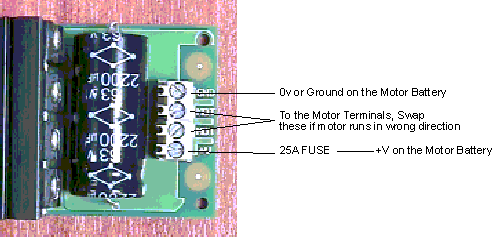
Motor connections
Note - There is no fuse on the PCB. You should provide a 10A fuse in line with the +v battery terminal.Don't Ignore this, High currents can be dangerous!
|
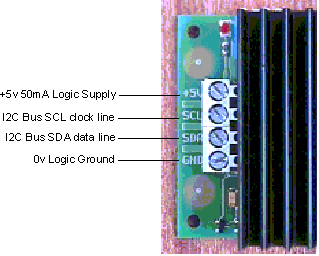
See text below for details of the other modes.
|
Analog Mode - 0v-2.5v-5v
In this mode the motor is controlled by a 0v to 5v analog signal only on the SDA line. Pin SCL is unused and should be connected to either +5v or 0v.0v is maximum reverse power
2.5v is the center stop position
5v is full forward power
The is a small (2.7%) dead band around 2.5v to provide a stable off position. Input impedance is 47k.
Analog Mode - 0v-5v
In this mode the motor is controlled by a 0v to 5v analog signal on the SDA line and direction on SCL. 0v is stop position5v is full power
Pin SCL is the logic level (ttl) direction control. logic 0 for reverse direction and logic 1 for forward direction.
You may also use a PWM signal instead of an analog voltage on the SDA line. There is a simple resistor/capacitor filter on the module which will generate the analog voltage from the incoming PWM signal. your PWM signal should be 20khz or greater in frequency and ideally, come from a CMOS gate (0-5v) rather than ttl (0-3.5v ish). a 0% duty cycle will represent 0v and a 100% duty cycle representing 5v. This applies to both the above analog modes.
RC Mode
This mode allows direct connection to standard model radio control receivers. Most receivers work from a 4.8v-6v battery pack and can be powered by 5v supply that powers the MD03 logic. The control pulse (Yellow) from the receiver should be connected to the SDA terminal. The SCL terminal is unused and should be connected to either +5v or 0v. Connect the receiver supply (Red) to +5v logic supply and the receiver 0v ground (Black) to the MD03 logic ground. The output from an RC receiver is a high pulse 1.5mS wide when the joystick is central. This varies down to 1.1mS and up to 1.9mS as the joystick is moved. This range can be shifted by the centering control by +/-100uS from 1mS-1.8mS to 1.2mS-2mS. The MD03 provides full control in the range 1.1mS to 1.9mS with 1.5mS being the center off position. There is a 7uS dead zone centered on 1.5mS for the off position. The Radio Transmitter centering control should be adjusted so that the motor is off when the joystick is released.I2C Mode
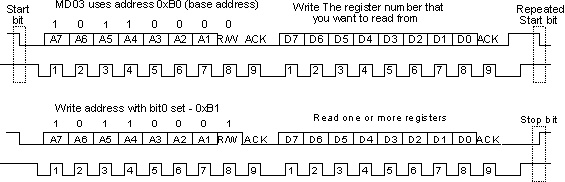
I2C mode allows the MD03 to be connected to popular controllers such as the OOPic and BS2p, and a wide range of micro-controllers like PIC's, 8051's and H8's. There are instructions for connecting the MD03 to the OOPic here. If you're writing your own code in C, then we have some downloadable software to communicate with the CMPS03 compass module, SRF08 sonar and MD03 motor driver here.
|
Register Address |
Name |
Read/Write |
Description |
| 0 | Command | R/W |
Write 01 Forwards - 02 Reverse (00 for instant stop - Rev9 firmware only) |
| 1 | Status | Read only | Acceleration, Temperature and Current Status |
| 2 | Speed | R/W | Motor Speed 0-255 (0x00 - 0xFF) |
| 3 | Acceleration | R/W | Motor Acceleration 0-255 (0x00 - 0xFF) |
| 4 | Temperature | Read only | Module temperature |
| 5 | Motor Current | Read only | Motor Current |
| 6 | Unused | Read only | Read as zero |
| 7 | Software Revision | Read only | Software Revision Number- Currently 9 |
Note - On all revisions the way to stop the motor is the same as other speed changes, write the new speed to the speed register and re-issue the direction command. This will cause the motor to decelerate to a stop at the rate set by the acceleration register. On Rev 9 firmware, writing zero the command register will stop the motor instantly, bypassing the acceleration value.
Status Register
Shows the status of the MD03
| Bit 7 (msb) | 6 | 5 | 4 | 3 | 2 | 1 | Bit 0 (lsb) |
| Busy | - | - | - | - | over-temperature limiter | over-current limiter | Acceleration in progress |
Bit 0 is read as high when the drive is still accelerating the motor to the requested speed. It will be cleared when the requested speed is achieved or the over current or over temperature limiters are active.
- Bit 1 set high indicates that the current through the motor has reached 20Amps and is being limited to that value. The Red LED will be illuminated when this happens.
- Bit 2 set high indicates that the over temperature limiter is active. Above a preset threshold, the motor current will be reduced in proportion to the MD03 temperature. The module can still be used but the motor power will be limited. The Red LED will be illuminated when this happens. It should be noted that a few minutes of running continuously at 20A will cause the heatsink to get hot - watch your fingers!
- Bit 7 is the busy flag. It is set high when you issue a new command to the module. It is cleared very quickly and you are unlikely ever to see it set.
Speed Register
Sets the maximum speed that the motor will accelerate to. It is actually the 8-bit value sent to the modules PWM controller. Write a value of 0 to 243 (numbers from 243 to 255 are clamped to 243) . The larger the number, the more power is applied to the motor.ÂAcceleration Register
This sets the rate at which the motor accelerates or decelerates from where it is towards the new speed set by the speed register. Write a value of 0 to 255, the larger the number the longer the module will take to reach the new speed. Writing zero to the acceleration register will allow maximum acceleration of 0 to full in 0.187 seconds. This value actually controls a timer which steps the current motor speed towards the requested motor speed. It does this every (((acceleration register)*125)+768)uS. A value of zero gives 768uS/step or 243*768=186624uS (0.187s) to accelerate from 0 to full. A value of 255 is ((255*125)+768)*243=7932249uS or just under 8 seconds.Temperature Register
This is the value used internally to limit the motor current if the module gets too hot. You do not need to read or do anything with it. It does not read degrees, in fact the number goes down as the temperature goes up! It is actually reading the forward voltage drop of a diode located under the 0.003R current sense resistor. The number drops by 1 count approx. every 1.42 degrees C.Motor Current
This is the value used internally to limit the motor current to 20A. You do not need to read or do anything with it. The value is proportional to motor current, with a value of 186 representing the 20A limit.Software Revision number
The revision number of the software in the modules PIC16F872 controller - currently 09 as of 15th August 2002.Mode Switches
The 4 mode switches set the operating mode of the MD03. They are read once only when the module is powered up. You cannot switch modes while the unit is on.Mode |
Switch 1 |
Switch 2 |
Switch 3 |
Switch 4 |
| I2C Bus - address 0xB0 | On | On | On | On |
| I2C Bus - address 0xB2 | Off | On | On | On |
| I2C Bus - address 0xB4 | On | Off | On | On |
| I2C Bus - address 0xB6 | Off | Off | On | On |
| I2C Bus - address 0xB8 | On | On | Off | On |
| I2C Bus - address 0xBA | Off | On | Off | On |
| I2C Bus - address 0xBC | On | Off | Off | On |
| I2C Bus - address 0xBE | Off | Off | Off | On |
| 0v - 2.5v - 5v Analog | On | On | On | Off |
| 0v - 5v Analog + Direction | Off | On | On | Off |
| Radio Control | On | Off | On | Off |
All other combinations are invalid, the LED will blink and nothing else will happen.
Note that I2C addresses are the upper 7 bits. Bit 0 the the read/write bit, so addresses 0xB0/0xB1 are write/read respectively to the same address.
General Usage
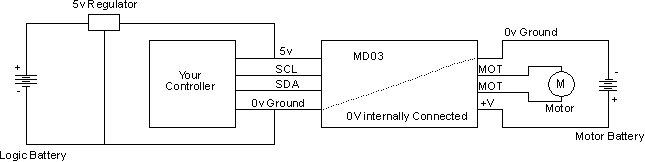
The MD03 can handle high currents, and you will need to take a few precautions with wiring. It is very important that you do not allow motor current to flow in the logic ground path. Don't assume that just because the Battery, MD03 and Controller grounds are all together, that all is well. If at all possible, use two batteries, one for the logic and and the other for the motor power. Don't connect the battery grounds together, that is already done on the MD03. If you do, then you will only create a ground loop - and problems. The diagram below shows the general idea on keeping the logic and power sides electrically and physically separate from each other.Â
|
PCB Drill Plan
The following drawing shows the MD03 mounting hole positions.
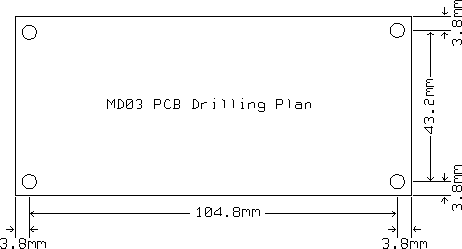
|
Schematics
The MD03 schematics in GIF format md03sch1 md03sch2For Additional information follow this link