OOPic SCP VB6 Software Interface
Home Home
Shop Shop
Contact Contact
Support Support
Robots Robots
Custom Engineering Custom Engineering
Educational Educational
Military/Law Enforcement Military/Law Enforcement

Ordering and Support: (919) 557-9162
Toll Free: 1-866-SD-Robots (866-737-6268)

 Store Search 
  or Goto 
 Website Search 
 Order Status 
 Shopping Cart 
Category  Category
Electrical & Controls \ OOPic
... to see category items, click here
Object Oriented Micro controllers that can be programmed with Basic, C or Java
Electrical & Controls \ RF (Wireless) Controllers
... to see category items, click here
RF Controllers to connect your PC to your Robot wirelessly!
Related Items  Related Items
USB Wireless Serial Interface USB Wireless Serial Interface

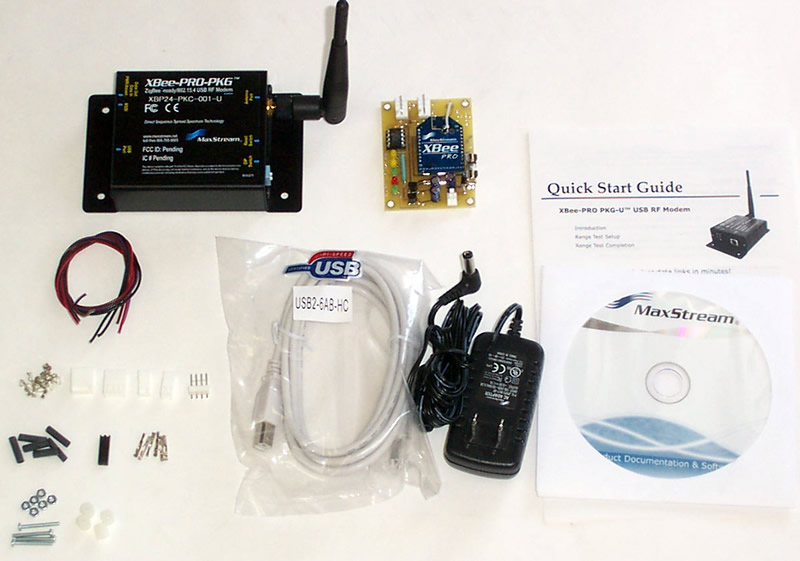
This wireless interface is designed and built to be versatile and flexible to link any microcontroller with the PC. Program, monitor and control your OOPic without wires. Range 300+ feet indoors; up to 1 mile line of site!  
More Detail


Item# TE-070-001
$238.90
In Stock
 
Item Detail  Item Detail
Name:
OOPic SCP VB6 Software Interface
Item#:
TE-071-000
Price/ea.
$44.00
In Stock
 QTY: 
OOPic SCP VB6 Software Interface

Relase 3 is now completed and availabe for download.  It includes a DirectX funtion for Gamepad Control.  We use a logitec Gamepad.  The joystick can be used to drive the robot, the buttons to turn objects on and off.   Source code is provided so you can edit the funtions of the 2nd joystick, Dpad, other buttons, etc.   Release 3 also has many other features for better file loading and saving, auto COM port detection, etc.

Serial Control Protocol is a set of new instructions to provide a fast means of accessing specific address locations for bits, bytes, words, and data.  The OOPic stores all these in addresses.  Use this program to easily talk with your OOPic.  Included are free updates and the VB6 source code and example programs.  This is a software download, which you will get access to after checking out.  The download is an installation program that will install a compiled version of the software on your PC.  I will also install data and example OOPic files along with the Visual Basic 6 source code.

Not only can you read the objects, but you can control the objects.  There is a specific SCP command set that is discused in length on the OOPic website and Denis Clark�s �Programming and customizing the OOPic Microcontroller�.  The basic premises is all B.2.2+ OOPics are loaded with SCP command sets.  When you compile a program and load it onto the OOPic, each object gets assigned an address.  You can use the SCP command set to read or control the object.  To start SCP you need to have a comm. port connection established with the OOPic and your PC (or other serial device).   We recommend our wireless interface USB controller or RS232 controller as a great method to wirelessly control your robot.  You can also use the wireless interface to download your OOPic programs too.


Once the comm. port is set and SCP has been successfully initiated you can begin reading and writing to the object memory addresses.  The SCP program does two things, it writes to the OOPic and it request data from the OOPic.  Each time it writes or reads, the first thing it does it tell the OOPic what memory address it is writing to or reading from. 


There are two ways to outputting to the OOPic manual or automatic.  In manual mode you can click the send data button next to the robot navigation target.  In auto, it will send data at the timer interval you set.  You can typically send data more than 5 times a second, depending on the packet size.


Each input and output has an assignable address, these address must match the OOPic�s memory address.  For the inputs you can scale the returned numbers, change the units, set an offset, etc.  For the Outputs, you can set them as digital or value driven, you can set the max, min, and defaults of each output along with the increments and dcrements you want to step through.  There is also a convienent mouse driven target that you can use to easily drive your robot with a click of a mouse. 


When data is returned from the OOPic it will show up in the raw Data in Rx Diagnostics.  The data is then parsed by the program and displayed in the input fields. 


For further information see our support page.  You can also download the help file that comes with the program to help you understand all the features this program is packed with.


Revision History:


Rev 0.0: Released 12/1/05.  Intial Release

Rev 1.0: Released 2/21/06.  Added funtionality and more data files.  

Rev2.0: Released 12/5/06.  Added more funtionality to the touch pad allowing it to drive more objects such as PWM controllers with a reverse bit.  We also made some other minor fixes and enhancements.  Also included are more expamples with the associated OOPic code.  Old data files will need to be updated manually (a file is included showing you how).

Rev2.1:  Released 3/5/07.  Fixed minor file loading bug.  Fixed file association with an oopic example.  Changed outputs to allow words to be written to oopic object. 

Rev3.0: Relese 8/30/07.  Added Joystick/Gamepad DirectX functions.  Added automatic COM port detection.  Enhanced file save and load options.  Additional example program with gamepad control.


Contact us if you previously purchased this for a free update.  

 
 Home  Shop  Contact  Support  Robots  Custom Engineering  Educational  Military/Law Enforcement

Copyright � 2001-2006 SuperDroid Robots Inc.
SuperDroid Robots Inc. is incorporated in Wake County, NC USA
SuperDroid Robots also does business as Team Half-Life
SuperDroid Robots is a registered trademark of Team Half-Life.
Prior to purchasing review our
Terms